You are not looking at the latest version of the documentation. Check it out there.
You are looking at draft pre-release documentation for the next release of Flows for APEX. Product features documented here may not be released or may have different behavior to that documented here.
You should not make any purchase decisions based on this draft documentation..
Flows for APEX Starter Workshop Code
Workshop: Code Snippets for Starter Workshop
This tutorial covers the development of a simple expense reimbursement application using Flows for APEX.
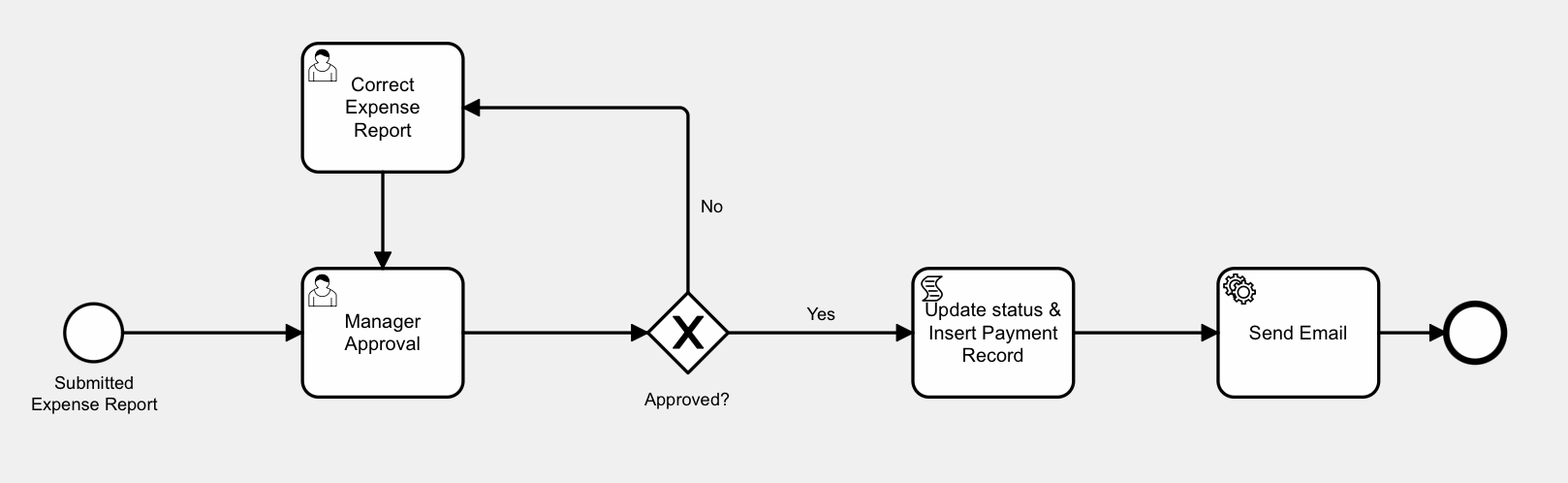
Code Snippets
For Script Task
declare
    l_process_id        number := flow_globals.process_id;
    l_expense_id        expense_report.id%type;
    l_employee_username expense_report.employee_username%type;
    l_category          expense_report.category%type;
    l_amount            expense_report.amount%type;
begin
    -- get business reference from workflow instance
    l_expense_id := flow_process_vars.get_business_ref(pi_prcs_id => l_process_id);

    --update expense status
    update expense_report
       set status = 'APPROVED'
     where id =  l_expense_id
     returning employee_username, category, amount
     into l_employee_username, l_category, l_amount;

     -- insert a payment request
    insert into payment_request
    (employee_username, category, amount)
    values
    (l_employee_username, l_category, l_amount);
end;
For Approved? Gateway - forward paths
:F4A$APPROVAL_OUTCOME = 'APPROVED'
:F4A$APPROVAL_OUTCOME = 'REJECTED'
For Send Email Service Task
Create 4 Variable Expressions that execute BEFORE TASK
EMAIL:
select employee_username
  from expense_report
 where id = :F4A$BUSINESS_REF
AMOUNT:
select amount
  from expense_report
 where id = :F4A$BUSINESS_REF
EXPENSE_DATE
select to_char(expense_date, 'DD/MM/YYYY')
  from expense_report
 where id = :F4A$BUSINESS_REF
CATEGORY
select category
  from expense_report
 where id = :F4A$BUSINESS_REF