<?xml version="1.0" encoding="utf-8"?><feed xmlns="http://www.w3.org/2005/Atom" ><generator uri="https://jekyllrb.com/" version="3.10.0">Jekyll</generator><link href="https://flowsforapex.org/feed.xml" rel="self" type="application/atom+xml" /><link href="https://flowsforapex.org/" rel="alternate" type="text/html" /><updated>2026-04-30T13:07:52+00:00</updated><id>https://flowsforapex.org/feed.xml</id><title type="html">Flows for APEX</title><subtitle>All available resources for Flows for APEX in one place, designed to help you get started and learn more about the product.</subtitle><entry><title type="html">Flows for APEX 25.1 release announcement</title><link href="https://flowsforapex.org/posts/release25.1/" rel="alternate" type="text/html" title="Flows for APEX 25.1 release announcement" /><published>2025-09-22T00:00:00+00:00</published><updated>2025-09-24T10:30:00+00:00</updated><id>https://flowsforapex.org/posts/release25.1</id><content type="html" xml:base="https://flowsforapex.org/posts/release25.1/"><![CDATA[<p>We are excited today to fully release  <strong>Flows for APEX v25.1</strong>, packed with exciting new features for both the <strong>Community Edition</strong> and <strong>Enterprise Edition</strong>.<br />
Both editions are now fully available, and existing users are now able to migrate their systems from 24.1 to 25.1.</p>

<h2 id="key-features-in-251">Key Features in 25.1</h2>

<h3 id="1-ai-service-task">1. AI Service Task</h3>

<p>Add AI-powered decisioning and generative tasks into business processes with simple, configurable service tasks.</p>

<ul>
  <li>Drive process. Routing with AI-based decision support outputs</li>
  <li>Generate summers, reports, personalized communications automatically</li>
  <li>Evolve your business processes to add GenAI steps within the framework of your existing processes</li>
  <li>Low code design of APEX  makes AI use simple and repeatable.</li>
</ul>

<h3 id="2-process-suspend-resume-and-rewind">2. Process Suspend, Resume, and Rewind*</h3>

<p>Gain precise control over long-running workflows by suspending, resuming, or rewinding processes at any step without losing state or context.</p>

<ul>
  <li>Suspend process instances safely for investigation or waiting events.</li>
  <li>Resume execution exactly where the process previously stopped.</li>
  <li>Rewind selected steps for correction or re-execution when required.</li>
  <li>Improve resilience and reliability of complex, long-lived workflows.</li>
</ul>

<p>Available in the <a href="https://flowquest.net/" target="_blank">Enterprise Edition</a>.</p>

<h3 id="3-enhanced-apex-human-task-integration">3. Enhanced APEX Human Task Integration</h3>

<p>Enhanced integration with APEX Human Tasks (Approval and Action Tasks)</p>
<ul>
  <li>Support task owner and administrator assignment from the controlling workflow.</li>
  <li>New plugin for declarative return of task state and outcome.</li>
  <li>Better removal and cleanup of cancelled or expired tasks.</li>
  <li>Integration of task definition and state into the Flows for APEX monitor.</li>
</ul>

<h3 id="4-message-queueing-for-process-isolation">4. Message Queueing for Process Isolation*</h3>

<p>Inter process communication using BPMN Message Flow in the Enterprise Edition now uses Oracle Advanced Queueing to decouple sending and receiving processes, increasing reliability when a process is suspended or a participant is offline.</p>

<h3 id="5-enhancements-to-event-logging">5. Enhancements to Event Logging</h3>

<p>Gain clearer visibility into workflow execution with flexible, fine-grained event logging, improving both audit readiness and developer debugging capabilities:</p>

<ul>
  <li>Now captures fine-grained step-level processing events.</li>
  <li>Flexible logging levels at system, diagram, or process instance.</li>
  <li>Highlight instances and steps executed with admin intervention.</li>
  <li>Improved control of log archiving and purging automations.</li>
  <li>Flexible logging meets monitoring, forensic audit, and debugging needs.</li>
</ul>

<h3 id="6-other-developer-features">6. Other Developer Features</h3>

<p>New developer-focused enhancements streamline modeling, improve error handling, and provide clearer visual cues for easier design and maintenance:</p>

<ul>
  <li>Script Task Error Boundary Events let PL/SQL throw BPMN errors.</li>
  <li>Model-defined process naming simplifies deployment and version management.</li>
  <li>Diagram badges highlight metadata directly within process diagrams.</li>
  <li>Updated Flow Viewer plugin built on web component architecture.</li>
  <li>Bundling plugins delivered as APEX Component Groups.</li>
</ul>

<h2 id="community-edition-still-open-source">Community Edition: Still Open Source!</h2>
<p>The <strong>Flows for APEX Community Edition</strong> remains 100% open source under the MIT license, with community support via GitHub.  The <strong>Flows for APEX Enterprise Edition</strong> includes product support and can be licenced from <a href="https://flowquest.net/">Flowquest</a>.</p>

<p>Explore the full details of version 25.1 and start transforming your workflows today!</p>

<p><em>Some features marked with an asterisk (*) are exclusive to the Enterprise Edition.</em></p>

<p><a href="https://flowsforapex.org/Flows4APEX251Features/">Learn more about the release</a>
<br /><a href="https://flowquest.net">Learn more about the Enterprise Edition</a></p>]]></content><author><name>Richard Allen</name></author><category term="Announcement" /><category term="25.1" /><category term="Enterprise Edition" /><category term="Community Edition" /><summary type="html"><![CDATA[We are excited today to fully release Flows for APEX v25.1, packed with exciting new features for both the Community Edition and Enterprise Edition. Both editions are now fully available, and existing users are now able to migrate their systems from 24.1 to 25.1.]]></summary></entry><entry><title type="html">Flows for APEX 24.1 Enterprise Edition release announcement</title><link href="https://flowsforapex.org/posts/release24.1ee/" rel="alternate" type="text/html" title="Flows for APEX 24.1 Enterprise Edition release announcement" /><published>2024-11-19T00:00:00+00:00</published><updated>2024-11-18T10:30:00+00:00</updated><id>https://flowsforapex.org/posts/release24.1.ee</id><content type="html" xml:base="https://flowsforapex.org/posts/release24.1ee/"><![CDATA[<p>We are excited today to fully release  <strong>Flows for APEX v24.1</strong>, packed with exciting new features for both the Community and the newly launched <strong>Enterprise Edition</strong>.<br />
Both editions are now fully available, and existing users are now able to migrate their systems from 23.1 to 24.1.</p>

<h2 id="key-features-in-241">Key Features in 24.1</h2>

<h3 id="1-developer-free-simple-form-task">1. Developer-Free Simple Form Task</h3>
<p>Empower business users to create simple processes without APEX or database skills. Users can now build process data input forms using JSON-typed variables.</p>

<h3 id="2-introducing-flows-for-apex-enterprise-edition">2. <strong>Introducing Flows for APEX Enterprise Edition</strong></h3>
<p>This new edition offers powerful features, including:</p>
<ul>
  <li>Process collaboration with BPMN Message Flow</li>
  <li>Iterating and looping of process steps</li>
  <li>GenAI support for process modeling with <strong>askFlo</strong></li>
</ul>

<p><a href="https://flowquest.net/" target="_blank">Enterprise Edition</a> users also gain access to product support and annual advisory sessions.</p>

<h3 id="3-full-process-collaboration-with-bpmn-message-flow">3. Full Process Collaboration with BPMN Message Flow*</h3>
<p>Enhanced inter-process communication:</p>
<ul>
  <li>Trigger new processes with message events</li>
  <li>Send/receive messages between processes</li>
  <li>Adjust workflows dynamically based on message inputs</li>
</ul>

<h3 id="4-iterating-and-looping-process-steps">4. Iterating and Looping Process Steps*</h3>
<p>Easily repeat tasks for each item in a list, array, or SQL query, either sequentially or in parallel, with full support for BPMN loops.</p>

<h3 id="5-genai-support-with-askflo">5. GenAI Support with askFlo*</h3>
<p>With GenAI assistance, users can:</p>
<ul>
  <li>Explain BPMN models in plain language</li>
  <li>Detect and correct model errors</li>
  <li>Suggest business process improvements</li>
</ul>

<h3 id="6-process-viewer-enhancements">6. Process Viewer Enhancements</h3>
<p>The enhanced BPMN Process Viewer now allows users to:</p>
<ul>
  <li>Drill into nested iterations</li>
  <li>Highlight model steps with BPMN Color</li>
  <li>Open user tasks directly from the viewer</li>
</ul>

<h2 id="community-edition-still-open-source">Community Edition: Still Open Source!</h2>
<p>The <strong>Flows for APEX Community Edition</strong> remains 100% open source under the MIT license, with community support via GitHub.</p>

<p>Explore the full details of version 24.1 and start transforming your workflows today!</p>

<p><em>Some features marked with an asterisk (*) are exclusive to the Enterprise Edition.</em></p>

<p><a href="https://flowsforapex.org/Flows4APEX241Features/">Learn more about the release</a>
<br /><a href="https://flowquest.net">Learn more about the Enterprise Edition</a></p>]]></content><author><name>Richard Allen</name></author><category term="Announcement" /><category term="24.1" /><category term="Enterprise Edition" /><summary type="html"><![CDATA[We are excited today to fully release Flows for APEX v24.1, packed with exciting new features for both the Community and the newly launched Enterprise Edition. Both editions are now fully available, and existing users are now able to migrate their systems from 23.1 to 24.1.]]></summary></entry><entry><title type="html">Flows for APEX 24.1 release announcement</title><link href="https://flowsforapex.org/posts/release24.1/" rel="alternate" type="text/html" title="Flows for APEX 24.1 release announcement" /><published>2024-10-10T00:00:00+00:00</published><updated>2024-10-10T10:30:00+00:00</updated><id>https://flowsforapex.org/posts/release24.1</id><content type="html" xml:base="https://flowsforapex.org/posts/release24.1/"><![CDATA[<p>We are excited to introduce <strong>Flows for APEX 24.1</strong>, packed with exciting new features for both the Community and the newly launched <strong>Enterprise Edition</strong>.</p>

<h2 id="key-features-in-241">Key Features in 24.1</h2>

<h3 id="1-developer-free-simple-form-task">1. Developer-Free Simple Form Task</h3>
<p>Empower business users to create simple processes without APEX or database skills. Users can now build process data input forms using JSON-typed variables.</p>

<h3 id="2-introducing-flows-for-apex-enterprise-edition">2. <strong>Introducing Flows for APEX Enterprise Edition</strong></h3>
<p>This new edition offers powerful features, including:</p>
<ul>
  <li>Process collaboration with BPMN Message Flow</li>
  <li>Iterating and looping of process steps</li>
  <li>GenAI support for process modeling with <strong>askFlo</strong></li>
</ul>

<p>Enterprise Edition users also gain access to product support and annual advisory sessions.</p>

<h3 id="3-full-process-collaboration-with-bpmn-message-flow">3. Full Process Collaboration with BPMN Message Flow*</h3>
<p>Enhanced inter-process communication:</p>
<ul>
  <li>Trigger new processes with message events</li>
  <li>Send/receive messages between processes</li>
  <li>Adjust workflows dynamically based on message inputs</li>
</ul>

<h3 id="4-iterating-and-looping-process-steps">4. Iterating and Looping Process Steps*</h3>
<p>Easily repeat tasks for each item in a list, array, or SQL query, either sequentially or in parallel, with full support for BPMN loops.</p>

<h3 id="5-genai-support-with-askflo">5. GenAI Support with askFlo*</h3>
<p>With GenAI assistance, users can:</p>
<ul>
  <li>Explain BPMN models in plain language</li>
  <li>Detect and correct model errors</li>
  <li>Suggest business process improvements</li>
</ul>

<h3 id="6-process-viewer-enhancements">6. Process Viewer Enhancements</h3>
<p>The enhanced BPMN Process Viewer now allows users to:</p>
<ul>
  <li>Drill into nested iterations</li>
  <li>Highlight model steps with BPMN Color</li>
  <li>Open user tasks directly from the viewer</li>
</ul>

<h2 id="community-edition-still-open-source">Community Edition: Still Open Source!</h2>
<p>The <strong>Flows for APEX Community Edition</strong> remains 100% open source under the MIT license, with community support via GitHub.</p>

<p>Explore the full details of version 24.1 and start transforming your workflows today!</p>

<p><em>Some features marked with an asterisk (*) are exclusive to the Enterprise Edition.</em></p>

<p><a href="https://flowsforapex.org/Flows4APEX241Features/">Learn more about the release</a></p>]]></content><author><name>Louis Moreaux</name></author><category term="Announcement" /><category term="24.1" /><summary type="html"><![CDATA[We are excited to introduce Flows for APEX 24.1, packed with exciting new features for both the Community and the newly launched Enterprise Edition.]]></summary></entry><entry><title type="html">Flows for APEX 23.1 release announcement</title><link href="https://flowsforapex.org/posts/release23.1/" rel="alternate" type="text/html" title="Flows for APEX 23.1 release announcement" /><published>2023-08-10T00:00:00+00:00</published><updated>2023-08-10T13:30:00+00:00</updated><id>https://flowsforapex.org/posts/release23.1</id><content type="html" xml:base="https://flowsforapex.org/posts/release23.1/"><![CDATA[<p>Flows for APEX 23.1 is now available for download at <a href="https://flowsforapex.org">flowsforapex.org</a>.</p>

<p>This release includes several exciting new features that are described in the paragraphs below.</p>

<h2 id="task-assignment-due-dates-and-priorities">Task Assignment, Due Dates and Priorities</h2>
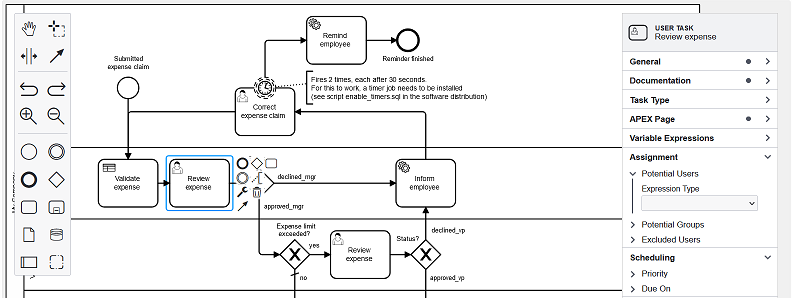
<p>With this release, we cover the missing part that was assignment, due dates and priorities. Not that it was not possible to handle it before by using lanes and some process variables but it is now much more easier.</p>

<p>Starting from version 23.1, in the modeler for User Task, you can now define:</p>
<ul>
  <li>The potential Users</li>
  <li>The potential Groups</li>
  <li>The excluded Users</li>
  <li>The priority</li>
  <li>The due date</li>
</ul>

<p>Like variable expressions, these attributes can be defined using</p>
<ul>
  <li>A static value</li>
  <li>A variable expression</li>
  <li>A SQL query (returning a single value or a colon delimited list)</li>
  <li>A PL/SQL expression or function body</li>
</ul>

<p><img src="https://flowsforapex.org/assets/images/231_blog_task_assignment.png" alt="Task assignment, due date and priority in the process modeler" title="Task assignment, due date and priority in the process modeler" class="align-center" /></p>

<h2 id="bpmn-message-flow">BPMN Message Flow</h2>
<p>With this release, we started the implementation of inter process communication through messages by implementing the following BPMN objects:</p>
<ul>
  <li>Send and Receive Tasks</li>
  <li>Message Catch and Throw Events</li>
</ul>

<p>Your process can now send messages to the outside world but also wait for an incoming message. Combined with the new REST API, this feature offers the ability for external applications to send a message and a payload that can be then used in your process!</p>

<h2 id="rest-api">REST API</h2>
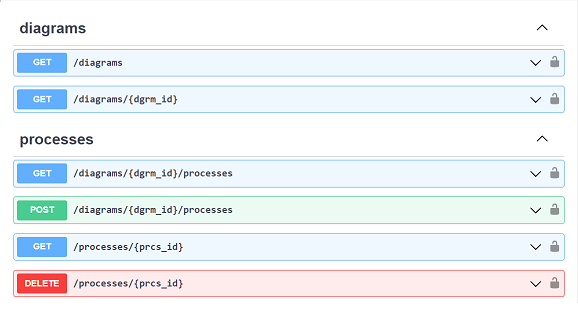
<p>That feature was probably one of the most asked by our customers, the Flows for APEX PL/SQL API is now REST-enabled so you can remotely execute all the API calls.</p>

<p><img src="https://flowsforapex.org/assets/images/231_blog_rest.png" alt="Swagger API doc" title="Swagger API doc" class="align-center" /></p>

<p>We also provide, in the engine app, a configuration page to create REST clients and assign them their roles based on the API call you want to allow.</p>

<p>We hope that this feature will make the integration of Flows for APEX with third-party system way more easier than before, we can’t wait to see what you will build with it!</p>


<h2 id="major-upgrade-to-graphical-workflow-modeler-and-viewer">Major Upgrade to Graphical Workflow Modeler and Viewer</h2>
<p>The <a href="https://bpmn.io/">bpmn.io</a> library has been updated to the latest version in our APEX plug-ins (modeler and viewer). The result is:</p>
<ul>
  <li>a much more modern properties panel</li>
  <li>an easier use of controls</li>
  <li>a better keyboard navigation</li>
  <li>a new capability to drill-down into collapsed SubProcesses and Call Activity (viewer only)</li>
  <li>a new support of BPMN Groups, Child Lanesets and Annotations</li>
</ul>

<p>We hope that this release will make process designers really happy.</p>

<h2 id="developer-experience-enhancements">Developer Experience Enhancements</h2>
<p>With this release, we also wanted to address a few things that we think APEX developers using Flows for APEX will find useful like:</p>
<ul>
  <li>the introduction of a new process variable type: Timestamp with Time Zone</li>
  <li>the support of process variable binding has been extended to SQL and PL/SQL everywhere</li>
  <li>a better integration with APEX Approval Task and Unified Task List</li>
  <li>the support of APEX automation for the Manage Flow Instance plug-in. One of the possible use cases is starting a flow instance from an APEX automation declaratively!</li>
</ul>

<h2 id="logging-archiving-and-process-statistics-improvements">Logging, Archiving, and Process Statistics improvements</h2>
<p>This release brings a lot of improvements for Process Administrators. Firstly, we implemented the process model and diagram changes logging. With this feature, we think that we fully cover the logging needs.</p>

<p>We also introduce a new Process Timeline page in the engine app, accessible through the action menu of the flow instance detail page. It will basically display, in a nice format, everything that happens to an instance.</p>

<p>We leverage the APEX automation power to create Instance Summary Archive and automated purging of the logs. Everything can be configured on the configuration pages.</p>

<p>Finally we started to implement process statistics by generating process and tasks statistics that include processing and waiting times. We do encourage you to turn on the statistics on your system to start gathering data about your processes!</p>

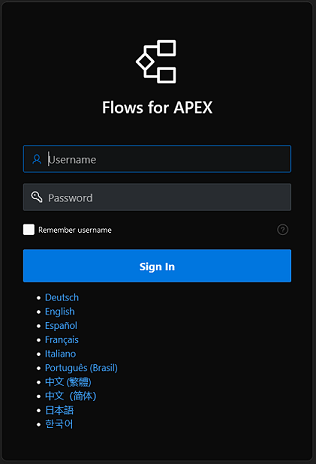
<h2 id="more-languages-supported">More Languages Supported</h2>
<p>Four new languages are now supported in Flows for APEX by the introduction of:</p>
<ul>
  <li>Italian</li>
  <li>Korean</li>
  <li>Simplified Chinese</li>
  <li>Traditional Chinese</li>
</ul>

<p>Flows for APEX is now supporting all of the 10 languages that the APEX Application Builder supports.</p>

<p><img src="https://flowsforapex.org/assets/images/231_blog_languages.PNG" alt="Flows for APEX langugage support" title="Flows for APEX langugage support" class="align-center" /></p>]]></content><author><name>Louis Moreaux</name></author><category term="Announcement" /><category term="23.1" /><summary type="html"><![CDATA[Flows for APEX 23.1 is now available for download at flowsforapex.org.]]></summary></entry><entry><title type="html">Flows for APEX 22.2 release announcement</title><link href="https://flowsforapex.org/posts/release22.2/" rel="alternate" type="text/html" title="Flows for APEX 22.2 release announcement" /><published>2022-10-11T00:00:00+00:00</published><updated>2022-10-11T12:00:00+00:00</updated><id>https://flowsforapex.org/posts/release22.2</id><content type="html" xml:base="https://flowsforapex.org/posts/release22.2/"><![CDATA[<p>Flows for APEX 22.2 is now available for download at <a href="https://flowsforapex.org">flowsforapex.org</a>. This major release has a lot of new functionality to offer, including:</p>
<ul>
  <li>Support for Call Activities in BPMN 2.0</li>
  <li>Gateway Path Expressions</li>
  <li>Integration with the Approval Task Component in APEX 22.1+</li>
  <li>Language support for Japanese, Portuguese, Spanish and German</li>
</ul>

<p>Richard Allen demonstrated key features of 22.2 in the APEX Office Hours session of 29-SEP. For those of you that missed that session, you can watch a replay <a href="https://www.youtube.com/watch?v=NlbRRvK9QjI">here</a>.</p>

<p>Minimum requirements for installation are Oracle DB 19c+ and Oracle APEX 20.1+. For a quick start, I suggest to install it in a free workspace on <a href="https://apex.oracle.com">https://apex.oracle.com</a>.</p>

<p>We have also updated the sample app “Expense Claims” that ships with the software distribution to reflect most of the new features in 22.2.
If you are new to BPMN 2.0, I recommend looking at the preinstalled tutorials in the Flows for APEX app.</p>

<p>Ready to start building your first process-oriented app based on Flows for APEX 22.2? Have a look at our updated step-by-step tutorial on the start page of <a href="https://flowsforapex.org">flowsforapex.org</a>.</p>]]></content><author><name>Niels de Bruijn</name></author><category term="Announcement" /><category term="22.2" /><summary type="html"><![CDATA[Flows for APEX 22.2 is now available for download at flowsforapex.org. This major release has a lot of new functionality to offer, including: Support for Call Activities in BPMN 2.0 Gateway Path Expressions Integration with the Approval Task Component in APEX 22.1+ Language support for Japanese, Portuguese, Spanish and German]]></summary></entry><entry><title type="html">Flows for APEX 21.1: what’s new</title><link href="https://flowsforapex.org/posts/release21.1/" rel="alternate" type="text/html" title="Flows for APEX 21.1: what’s new" /><published>2021-09-30T00:00:00+00:00</published><updated>2021-09-28T12:00:00+00:00</updated><id>https://flowsforapex.org/posts/release21.1</id><content type="html" xml:base="https://flowsforapex.org/posts/release21.1/"><![CDATA[<p>Flows for APEX is an extension for Oracle Application Express (APEX) that lets you model and run processes based on the BPMN 2.0 standard. This blog article will address some of the key features introduced with version 21.1.</p>

<h4 id="setting-process-variables-before-andor-after-each-step">Setting process variables before and/or after each step</h4>
<p><img src="https://flowsforapex.org/assets/images/varExpression.apng" alt="image-center" class="align-center" /></p>

<p>With the help of process variables, information can be stored persistently in the database over the entire duration of a process instance. You can set a process variable through the PL/SQL API or, with 21.1, do this declarative for each step in the BPMN model. The variables are meant to be set at special trigger points in the model (e.g., after a task has been executed or before the process is split up at a gateway) and read out again at a later point in time without the need of an APEX session.</p>


<h4 id="restart-failed-tasks">Restart failed tasks</h4>
<p><img src="https://flowsforapex.org/assets/images/errorHandling.apng" alt="image-center" class="align-center" /></p>

<p>Sometimes the execution of a step in a process fails, so that the process cannot continue. In this case, the transaction of the current step is rolled back, and the instance is set to an error state. With the help of the previously mentioned auditing capabilities, the error can be located and fixed. To restart the step, either execute the PL/SQL procedure flow_api_pkg.flow_restart_step or press the corresponding button on the Flow Monitor page.</p>

<h4 id="more-engine-app-enhancements">More engine app enhancements</h4>
<p><img src="https://flowsforapex.org/assets/images/keyboardShortcuts.apng" alt="image-center" class="align-center" /></p>

<p>The Flows for APEX engine app is used to manage the BPMN models and process instances. With version 21.1, several enhancements have been made:</p>
<ul>
  <li>Use of keyboard shortcuts in the modeler (copy, paste, save)</li>
  <li>Support for dark mode</li>
  <li>Layout adjustments to support different screen sizes</li>
  <li>Bulk export/import of models</li>
  <li>Export of a model or an instance as SVG</li>
</ul>

<h4 id="process-plug-ins-for-a-true-low-code-experience">Process plug-ins for a true low-code experience</h4>

<p>Next to the existing region plug-in “Flows for APEX viewer” for displaying BPMN models, 3 process plug-ins were introduced that can be used in your own APEX application to manage a flow instance without the need of custom coding:</p>

<ol>
  <li>Management of the entire flow instance (start, stop, terminate, reset, delete)</li>
  <li>Management of a single step within the flow instance (start, reserve, release, complete)</li>
  <li>Management of process variables of a flow instance (setting / reading out the variables in conjunction with APEX page items)</li>
</ol>

<p>The plugins are included in the distribution of the Flows for APEX application and can be easily exported and imported to be used in own applications.</p>

<h4 id="auditing">Auditing</h4>

<p>During the execution of a process flow, information is written to a logging table at various points in Flows for APEX. This includes events occurring at instance level as well as task-level together with a timestamp and the calling user. These can be called upon in the engine app via the detail page of a process instance for management and debugging purposes. Furthermore, logging information for a specific step in the instance can be displayed by simply clicking on it in the Flows for APEX Viewer.</p>

<h4 id="sample-app-expense-claims">Sample app “Expense Claims”</h4>

<p>To demonstrate the integration of Flows for APEX in an APEX application, a new demo application comes with the distribution of Flows for APEX 21.1. This application covers a simple expense claim process and helps APEX developers to understand how to develop process-driven applications.</p>]]></content><author><name>Niels de Bruijn</name></author><category term="Announcement" /><category term="21.1" /><summary type="html"><![CDATA[Flows for APEX is an extension for Oracle Application Express (APEX) that lets you model and run processes based on the BPMN 2.0 standard. This blog article will address some of the key features introduced with version 21.1.]]></summary></entry></feed>